

How Odokai works.
AI agents that gather, draft, check and chase for your team, using the tools and data you already have. Your people keep the judgement and the final yes.
Hand the legwork to agents. Keep the judgement.
-
01
What is Odokai?
An agentic operating system for your business: a platform where your team builds, runs and governs AI agents, workflows and apps. Subscribe to it as a service, or have your own instance, managed in our cloud or yours.
What it is -
02
How does it work?
You talk to an agent in a session. It follows your skills, uses your connectors and data, and keeps working on schedules, plans and apps when nobody is asking.
How it works -
03
Why would we want it?
The foundations to get real value from AI: agents that do the work, knowledge that stays with the business, and governance built in.
Why teams use it -
04
Why not ChatGPT, Claude or Copilot?
Excellent tools, on the vendor's terms. Odokai runs in our cloud or yours, and you can still use the same OpenAI and Anthropic models.
How it compares
An agentic operating system for your business.
Odokai is a platform where your team builds, runs and governs AI agents, workflows and apps on your own data. Subscribe to it as a service on our shared platform, or have your own instance, managed in our cloud or yours.
Agents read the inbox, query the database, follow the way your team does things, and hand back finished work for a person to check, with no copying and pasting. Everyone starts with the Odokai Assistant. A job that keeps coming back gets a specialist agent of its own, shared with the whole team.
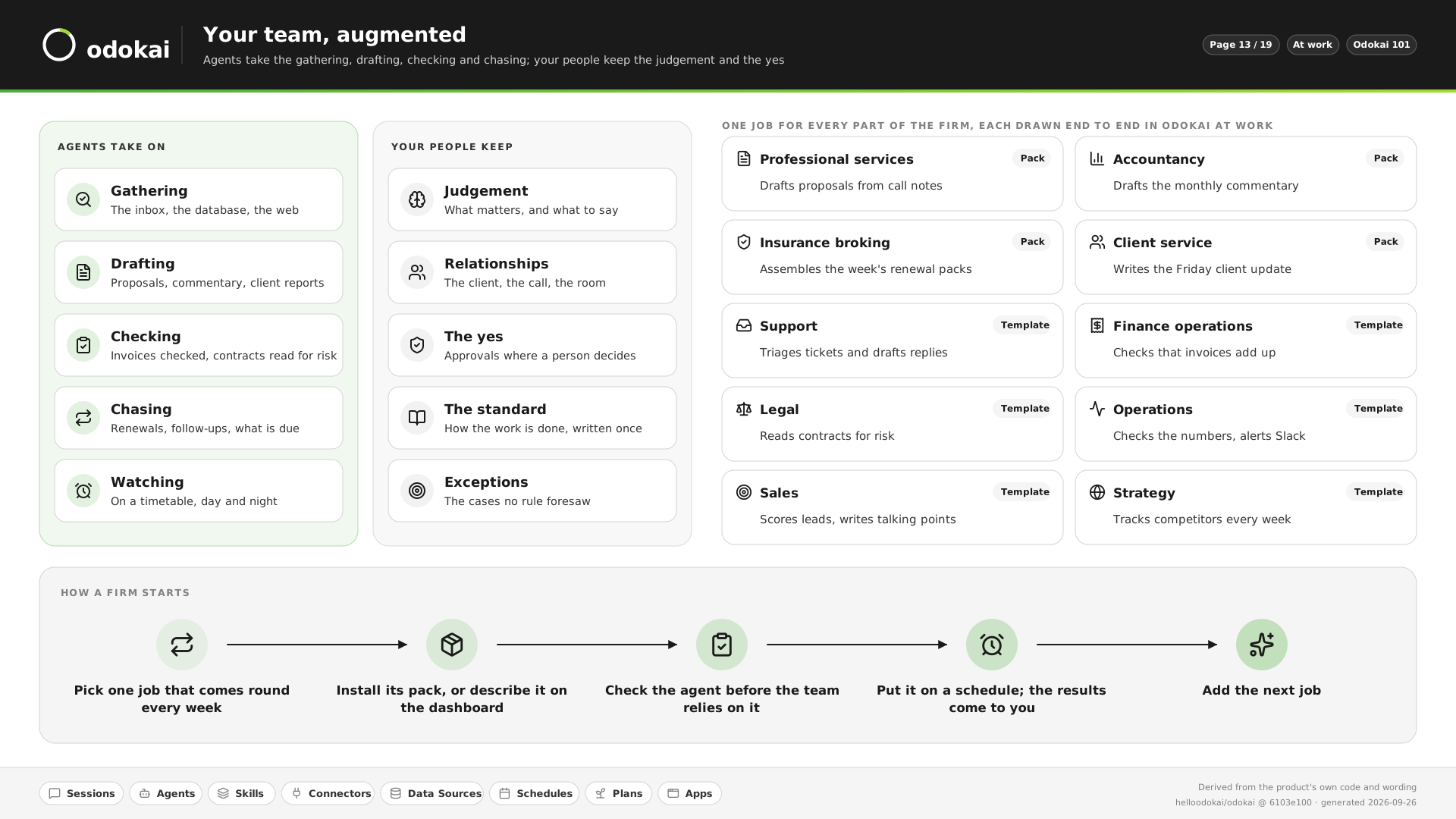
Agents take on
- Gathering. The inbox, the database, the web.
- Drafting. Proposals, commentary, client reports.
- Checking. Invoices added up, contracts read for risk.
- Chasing. Renewals, follow-ups, what is due.
- Watching. On a timetable, day and night.
Your people keep
- Judgement. What matters, and what to say.
- Relationships. The client, the call, the room.
- The yes. Approvals where a person decides.
- The standard. How the work is done, written once.
- Exceptions. The cases no rule foresaw.
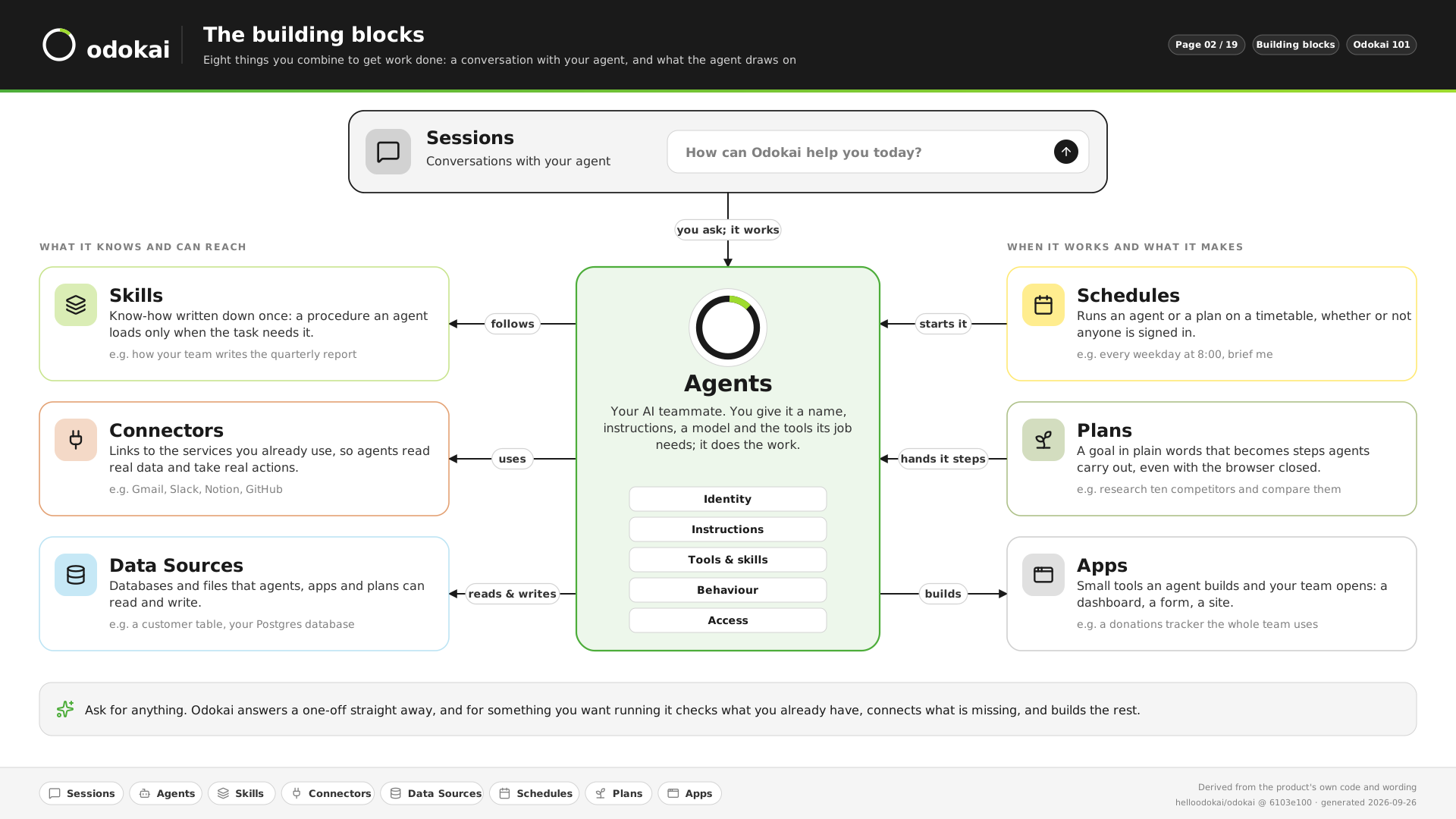
You ask. An agent does the work.
Most of the time you just start a conversation with an agent. Seven more building blocks give it your know-how, your tools and your data, and keep the work going when nobody is asking.
-
For something done right now
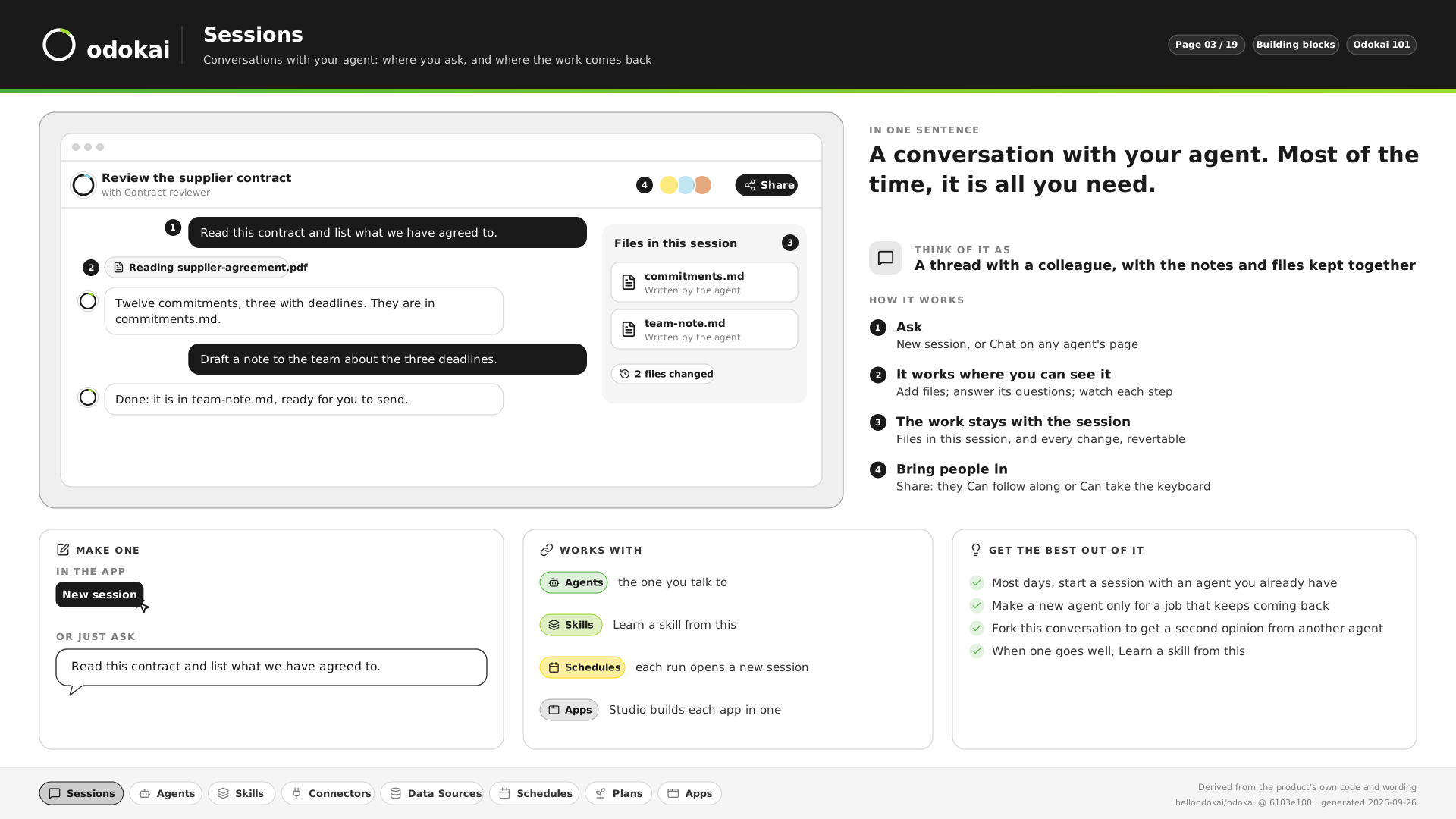
Sessions
A conversation with your agent, with its files kept alongside. Most of the time, it is all you need.
“Read this contract and list what we have agreed to.”
See it in pictures -
For a job that keeps coming back
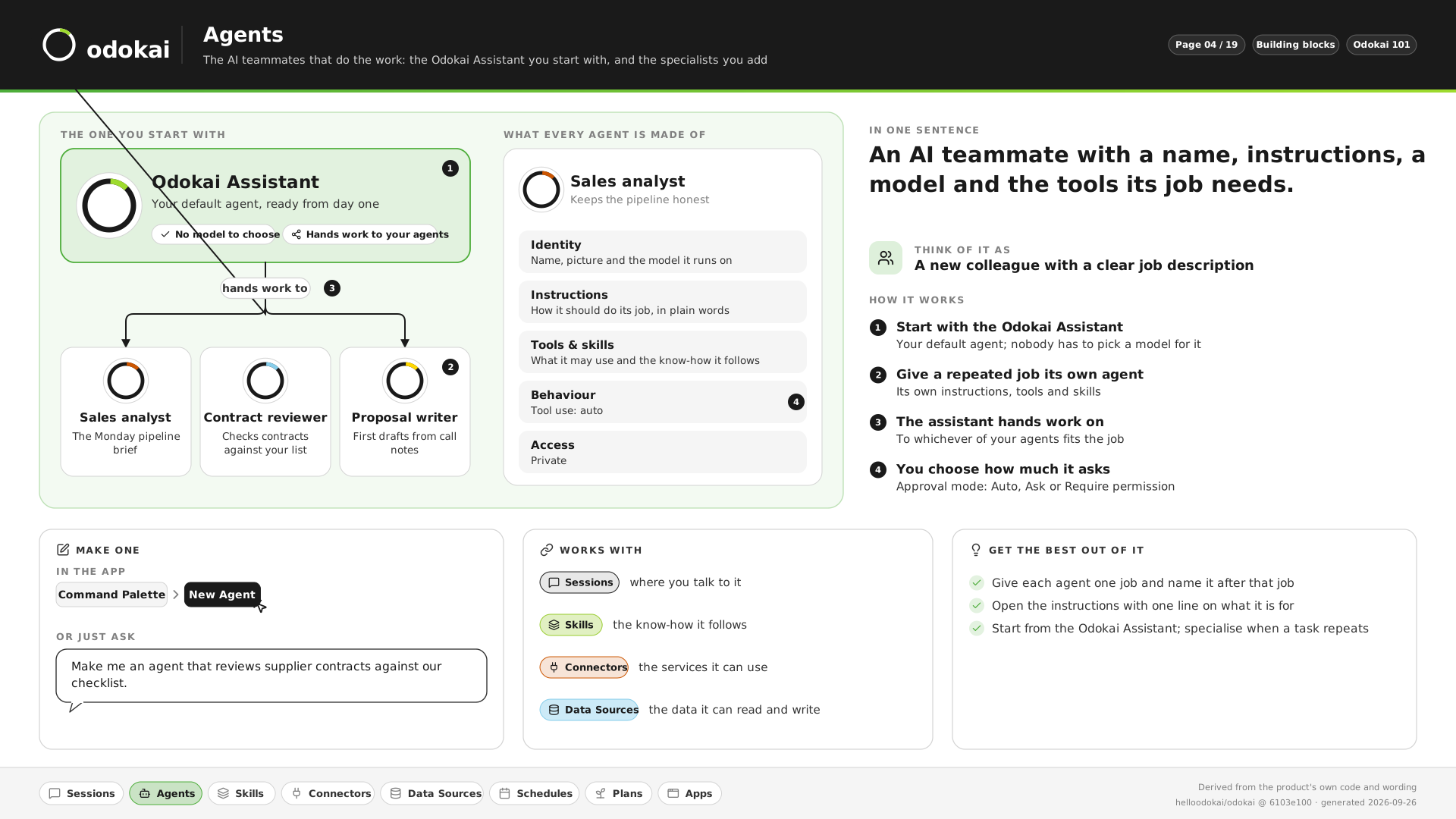
Agents
An AI teammate with a name, instructions, a model and the tools its job needs.
“Make me an agent that reviews supplier contracts against our checklist.”
See it in pictures -
For a task done your way, every time
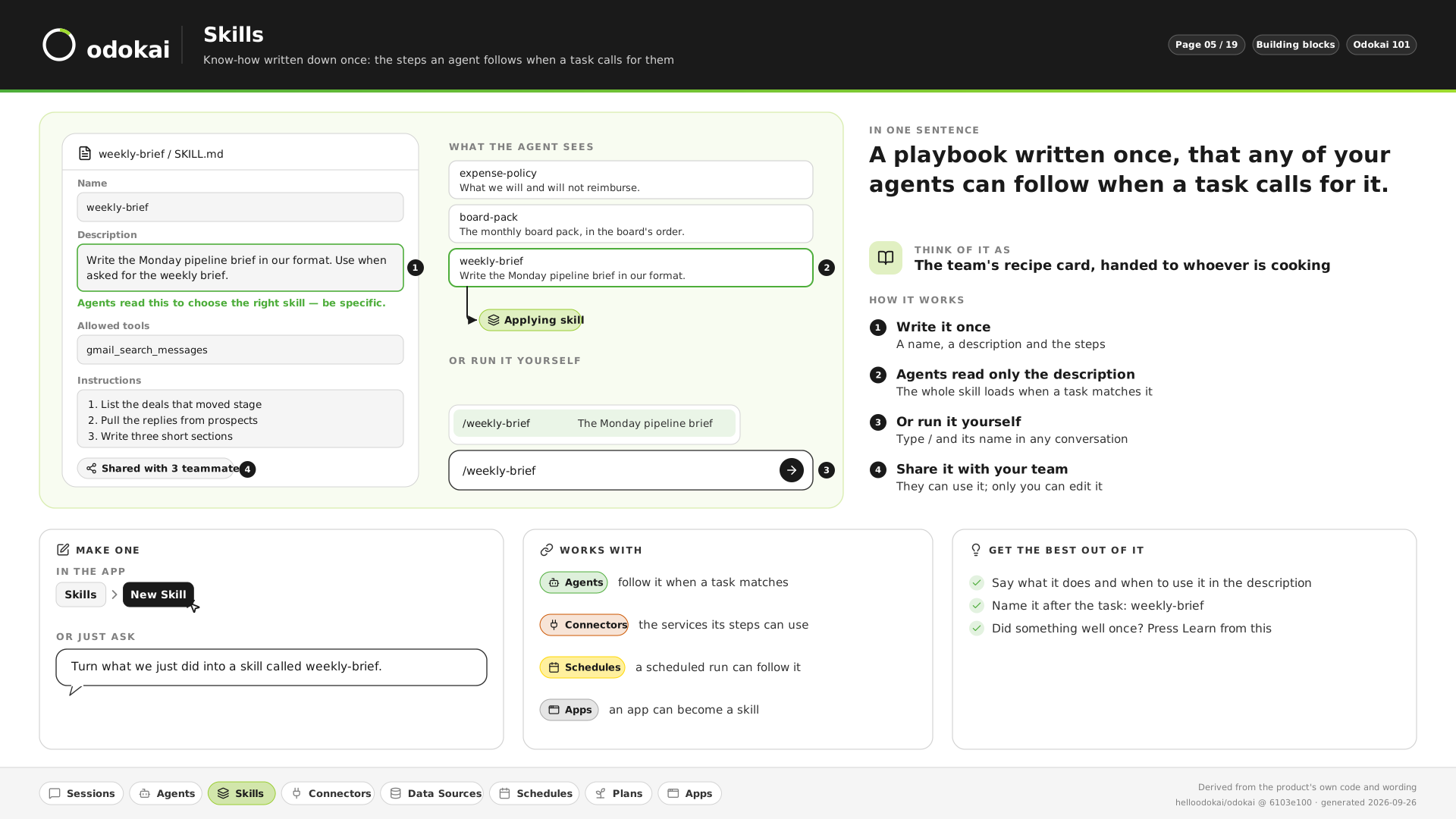
Skills
A playbook written once, that any of your agents follows when a task calls for it.
“Turn what we just did into a skill called weekly-brief.”
See it in pictures -
For agents in your email, chat or CRM
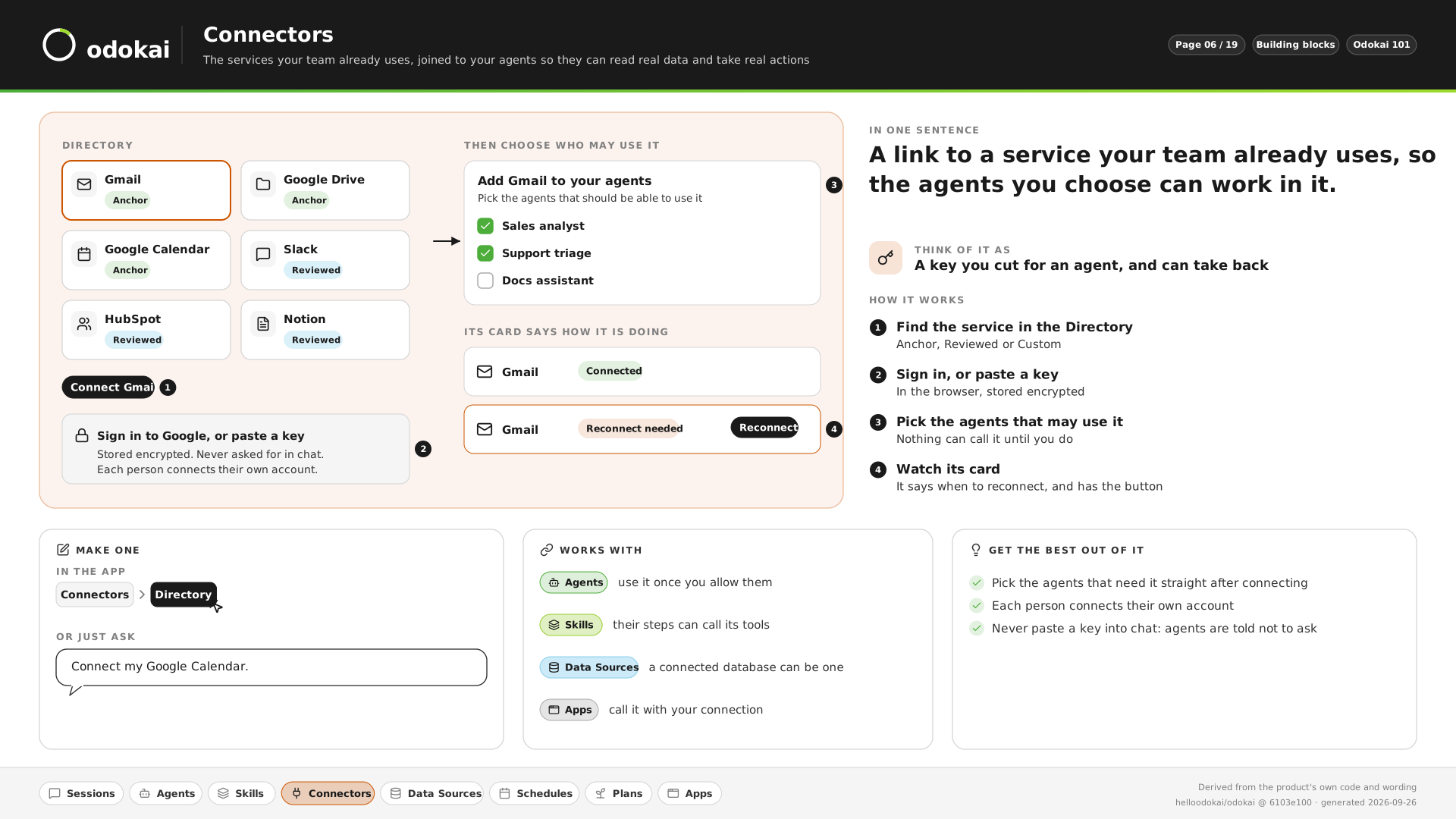
Connectors
A link to a service your team already uses, such as Gmail, Slack or HubSpot, so the agents you choose can work in it.
“Connect my Google Calendar.”
See it in pictures -
For answers from your own figures
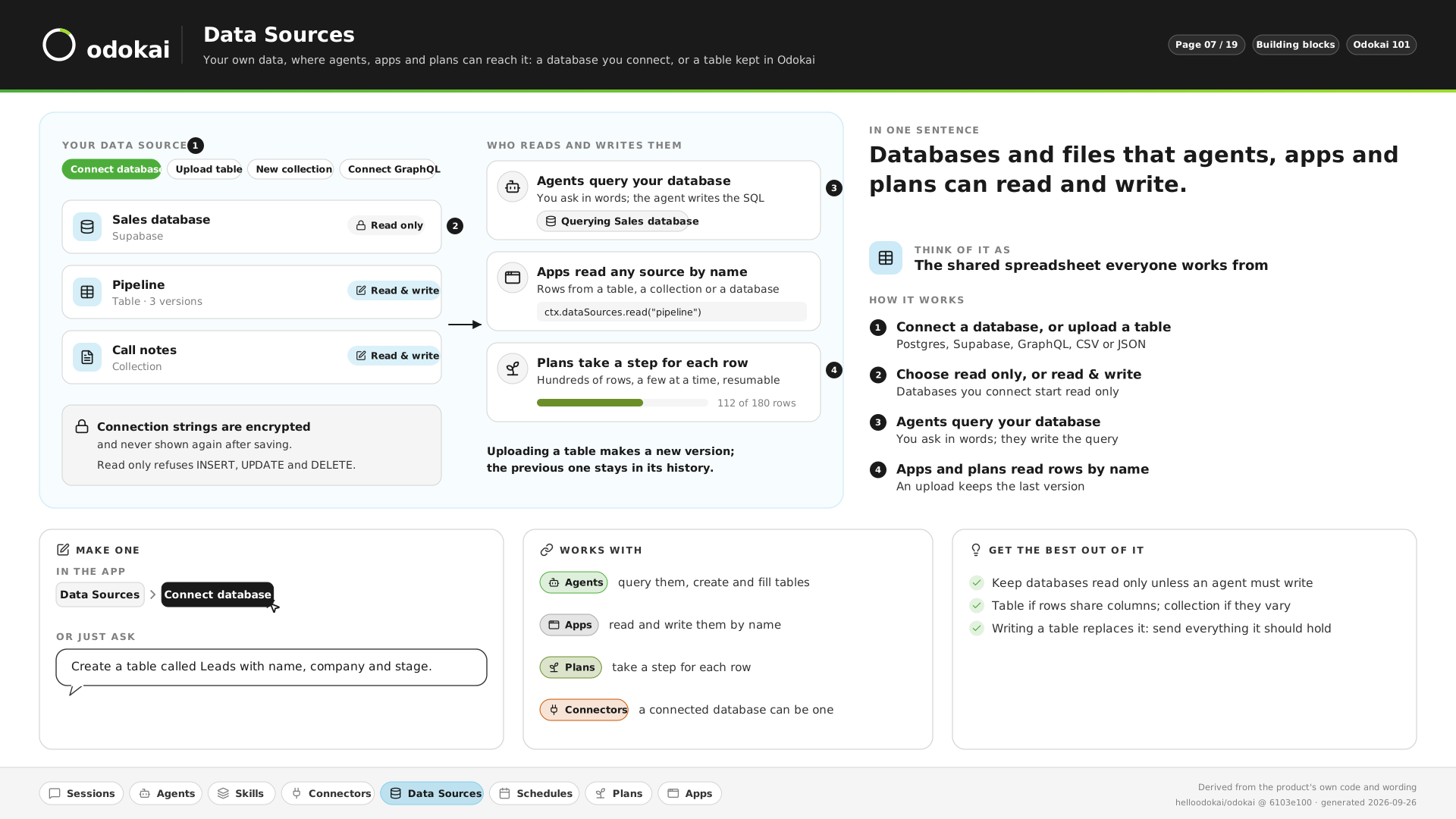
Data Sources
Your databases and tables, read only unless you say otherwise. You ask in words; the agent writes the query.
“Which customers have not ordered in ninety days?”
See it in pictures -
For a brief every morning, without asking
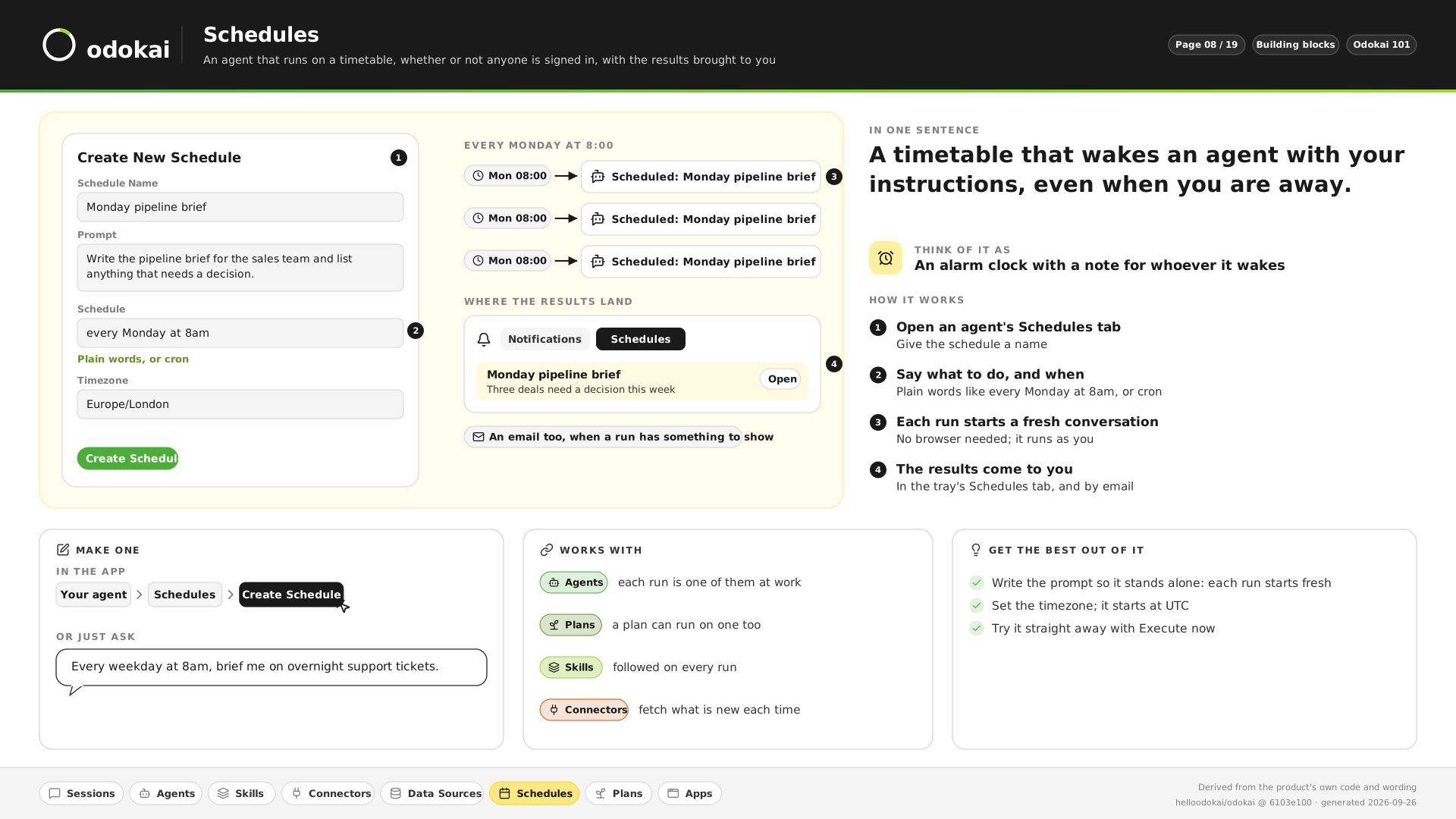
Schedules
A timetable that wakes an agent with your instructions, even when you are away, and brings you the results.
“Every weekday at 8am, brief me on overnight support tickets.”
See it in pictures -
For a big goal you come back to later
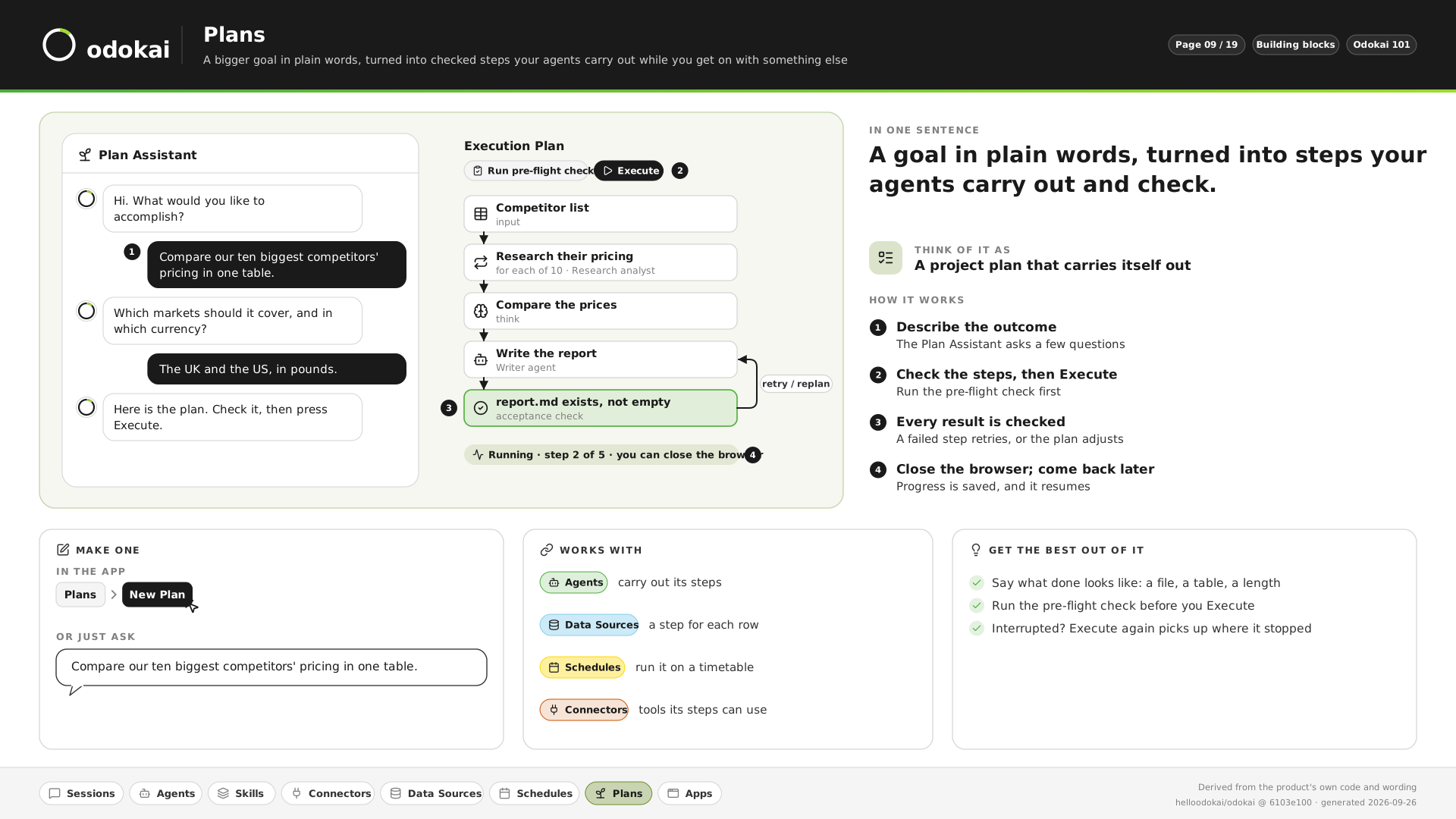
Plans
A goal in plain words, turned into checked steps your agents carry out, even with the browser closed.
“Compare our ten biggest competitors’ pricing in one table.”
See it in pictures -
For a tool your team can open
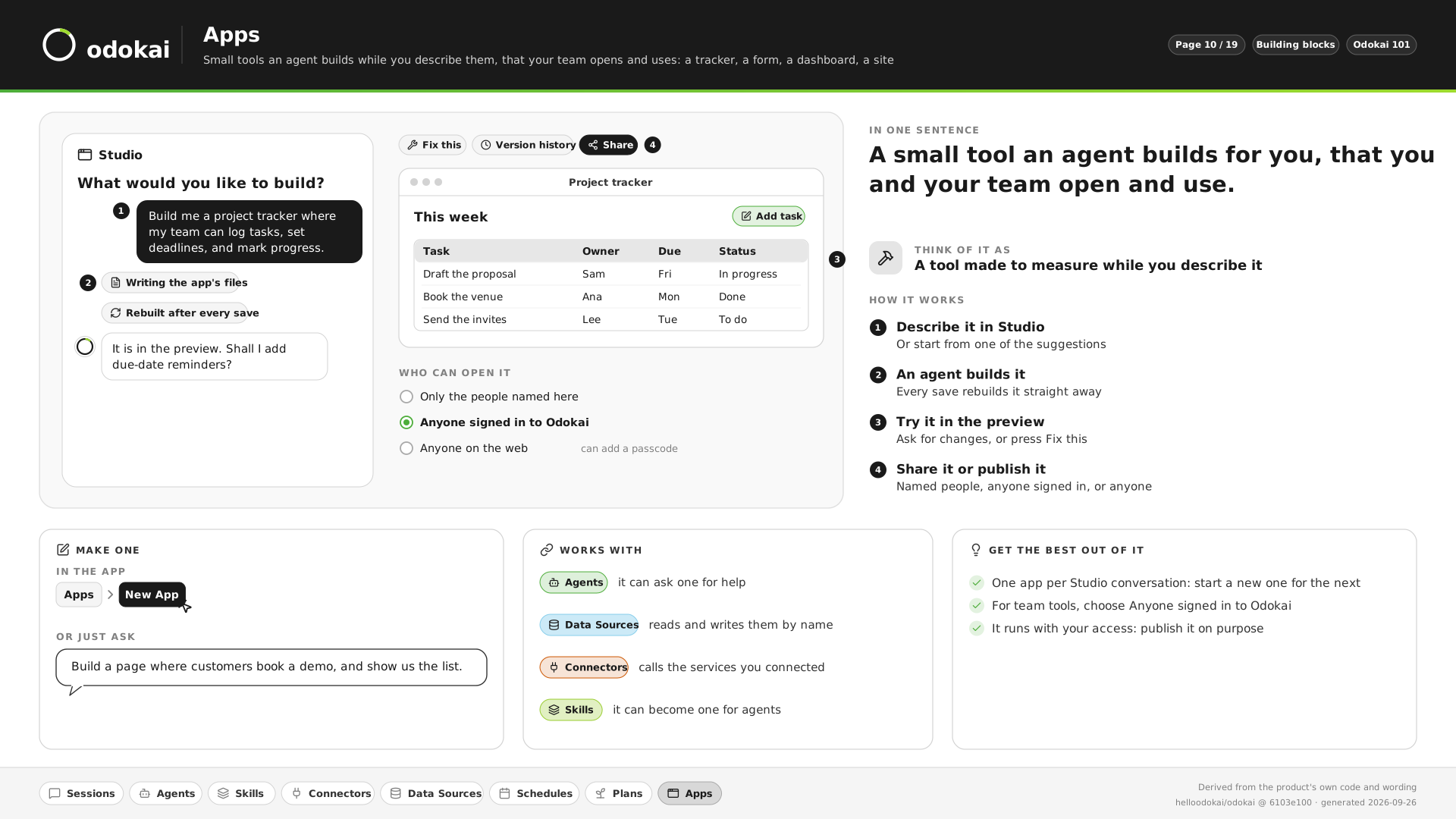
Apps
A tracker, a form, a dashboard or a site, built by an agent while you describe it.
“Build a page where customers book a demo, and show us the list.”
See it in pictures
Not sure which you need? Describe the problem. Odokai checks what you already have, connects what is missing, and builds the rest.
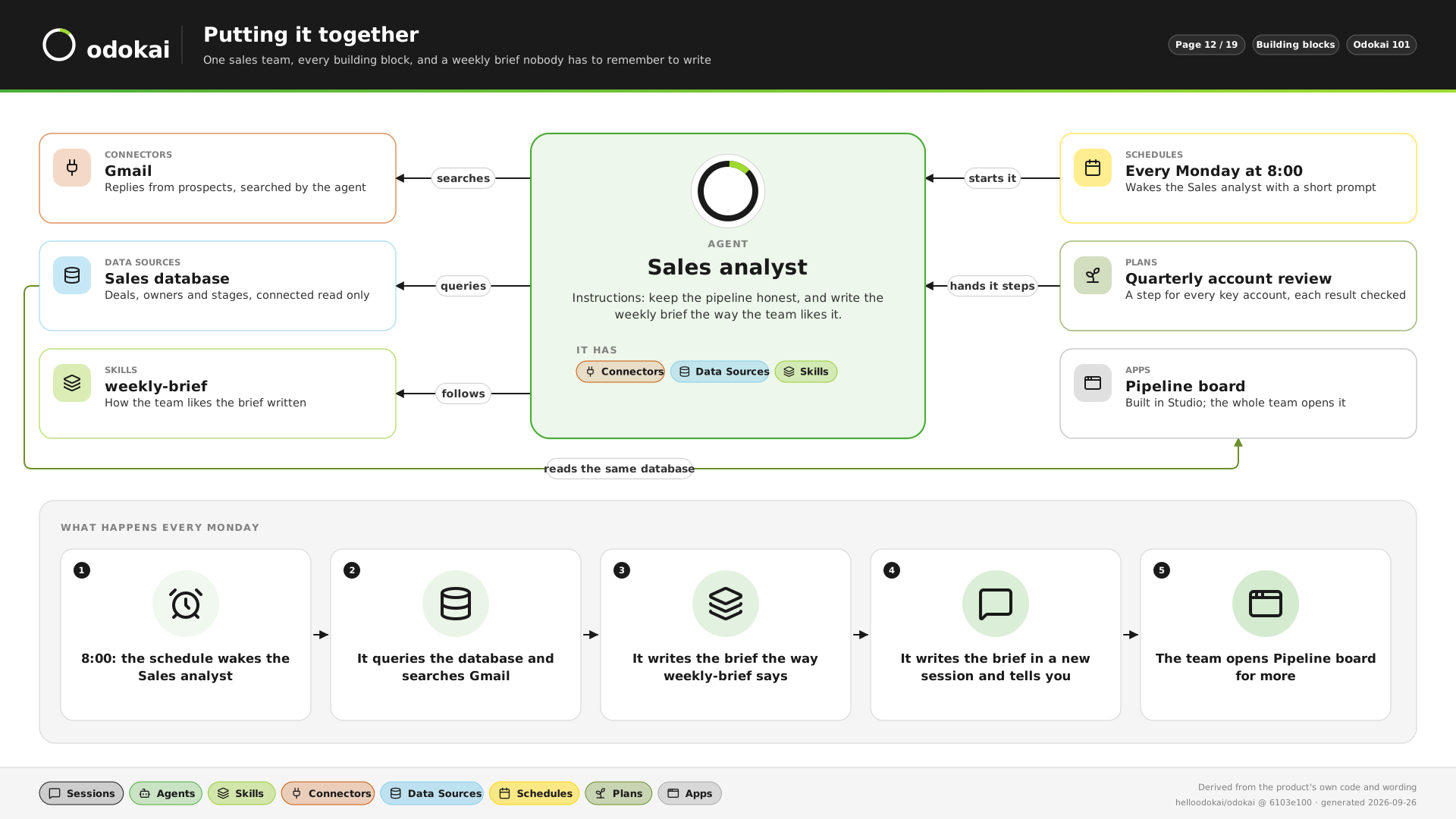
The Monday brief nobody has to remember to write.
- 08:00. A schedule wakes the Sales analyst agent.
- It queries the sales database and searches Gmail for replies from prospects.
- It writes the brief the way the team’s weekly-brief skill says.
- The brief lands in a new session, and you are told.
- The team opens the Pipeline board app for more.
Agents do the legwork. Your people make the decisions.
Odokai gives you the foundations to get real value from AI across the business, not just a chat window. Every firm has jobs that come round every week: the renewals, the month-end commentary, the Friday update, the inbox full of invoices. Odokai takes the gathering, drafting and checking off your people’s desks, so their hours go on clients, judgement and the decisions only they can make.
Renewals, ready every Monday
A pack for every renewal falling due, built before the brokers arrive, with the ones that need a call flagged. A broker makes the calls.
AccountancyManagement accounts, commentary drafted
Every client’s monthly commentary written from the figures on the 5th, waiting for an accountant to sign it off.
Finance operationsInvoices checked before anyone pays
Every invoice read, its sums checked and matched to its order, with anything odd held back. Finance approves the payment run.
LegalA first read of every contract
Each contract read against your playbook and the risky clauses scored. The lawyer decides what to negotiate.
Done before anyone asks
Schedules and plans run whether or not anyone is signed in. The brief is waiting at 8am; the packs are ready before the team arrives.
Your way, every time
Write how your team does a job once, as a skill. Every agent follows it, so the standard does not depend on who is in the office.
Inside rules you set
Agents ask before they act where you say they must, sensitive data follows rules your admin chooses, and every action leaves a record.
Knowledge that stays
Documents, policies and playbooks every agent can use and cite. What agents learn belongs to the business, so it stays when people leave.
Any model
Any provider with an OpenAI-compatible API, or local models, chosen per task and per kind of data. Switch as better models arrive.
Apps as well as answers
Build internal tools in App Studio, such as a client portal or a compliance tracker, on your own data.
Excellent assistants, on the vendor’s terms.
ChatGPT Enterprise, Microsoft 365 Copilot and Claude Enterprise are excellent, and for many teams they are the right buy. They also come with boundaries that don’t suit every business. Odokai doesn’t ask you to give up their models: you can still use the same OpenAI and Anthropic models inside it.
Their boundaries
- Their platform. A vendor service you can’t run in your own cloud account. What you build lives inside their product.
- Their models. ChatGPT and Claude use their own vendor’s models; Copilot offers OpenAI and Anthropic.
- Knowledge tied to people. Memory belongs to individual users or projects.
- Their pricing. Per-seat fees, plus usage billing that can grow with heavy use.
With Odokai
- Your cloud or ours. A shared instance, or your own instance managed in our cloud or yours. What you build stays yours.
- Any model, theirs included. OpenAI and Anthropic models, any OpenAI-compatible provider, or local models for work that must stay inside your environment.
- Knowledge the business keeps. Shared knowledge that stays when people leave.
- A cost you can plan. A fixed monthly fee with included credits and a cap you set.
Capable agents, on rules you set.
Every agent works inside your organisation, under rules a person sets, and leaves a record of what it did.
-
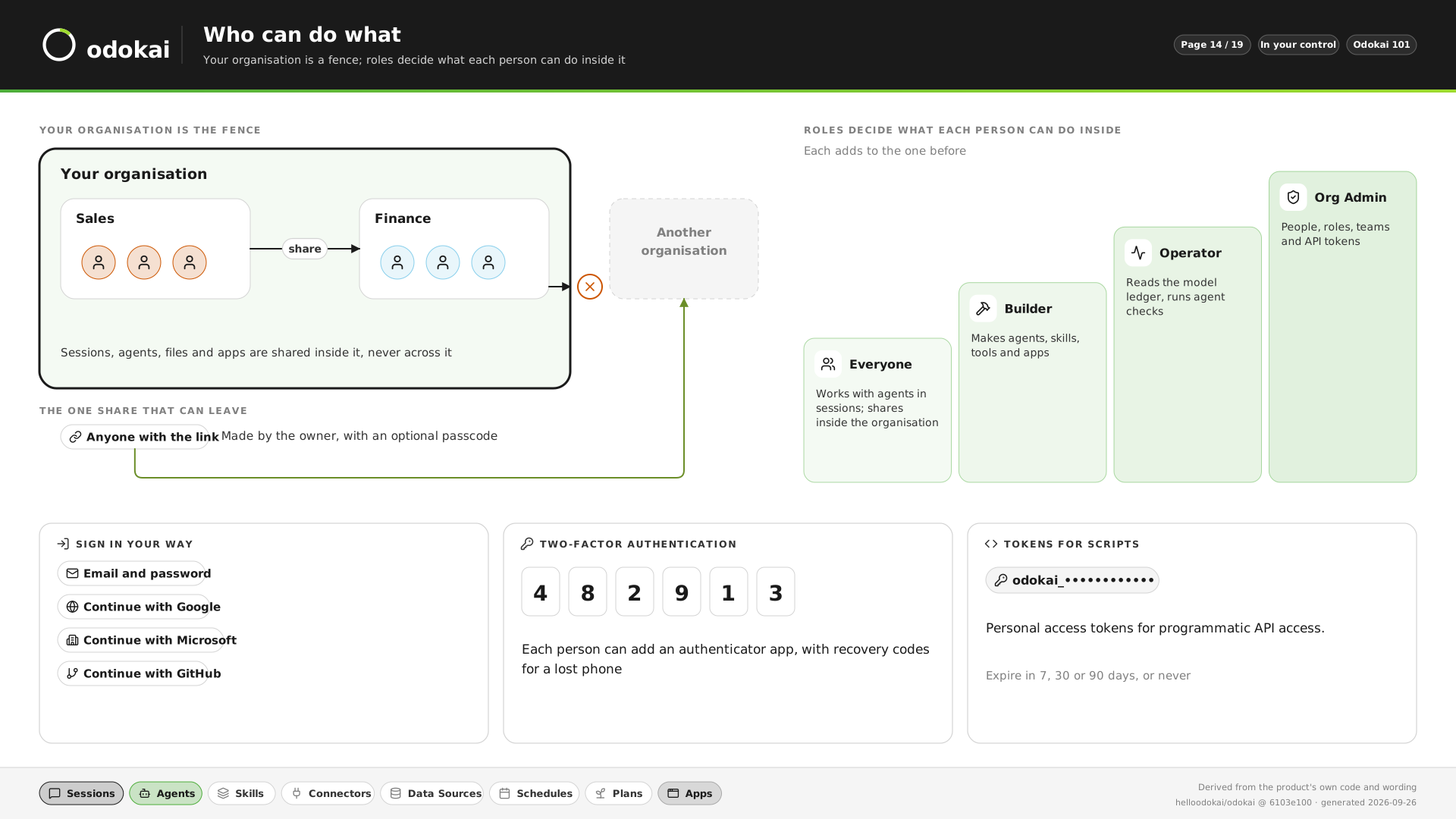
Who can do what
Everything stays inside your organisation. Roles decide what each person can do there, and everyone can sign in with two-factor authentication.
See it in pictures -
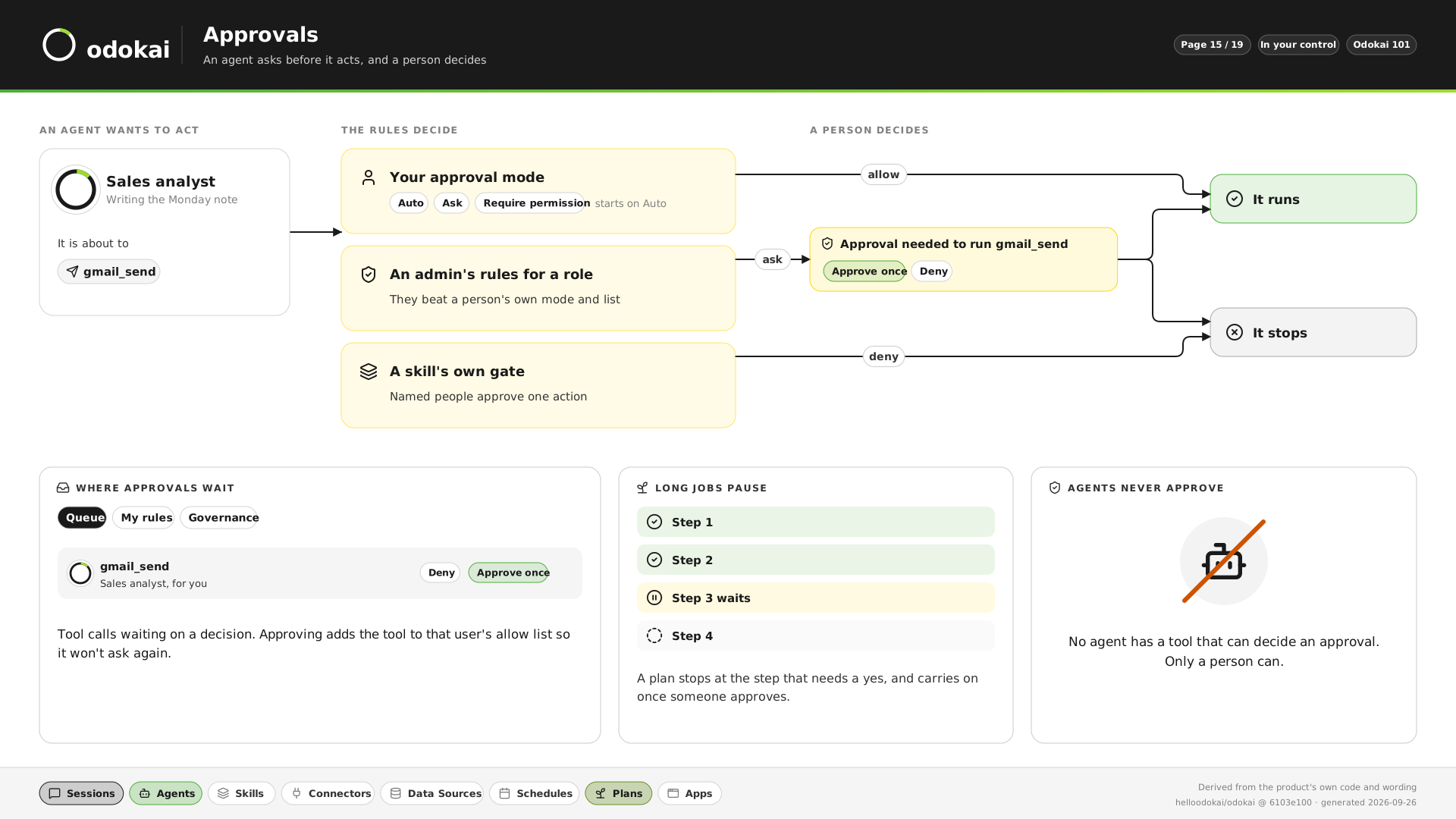
Approvals
An agent asks before it acts, and a person decides. A plan pauses at the step that needs a yes. No agent can approve anything.
See it in pictures -
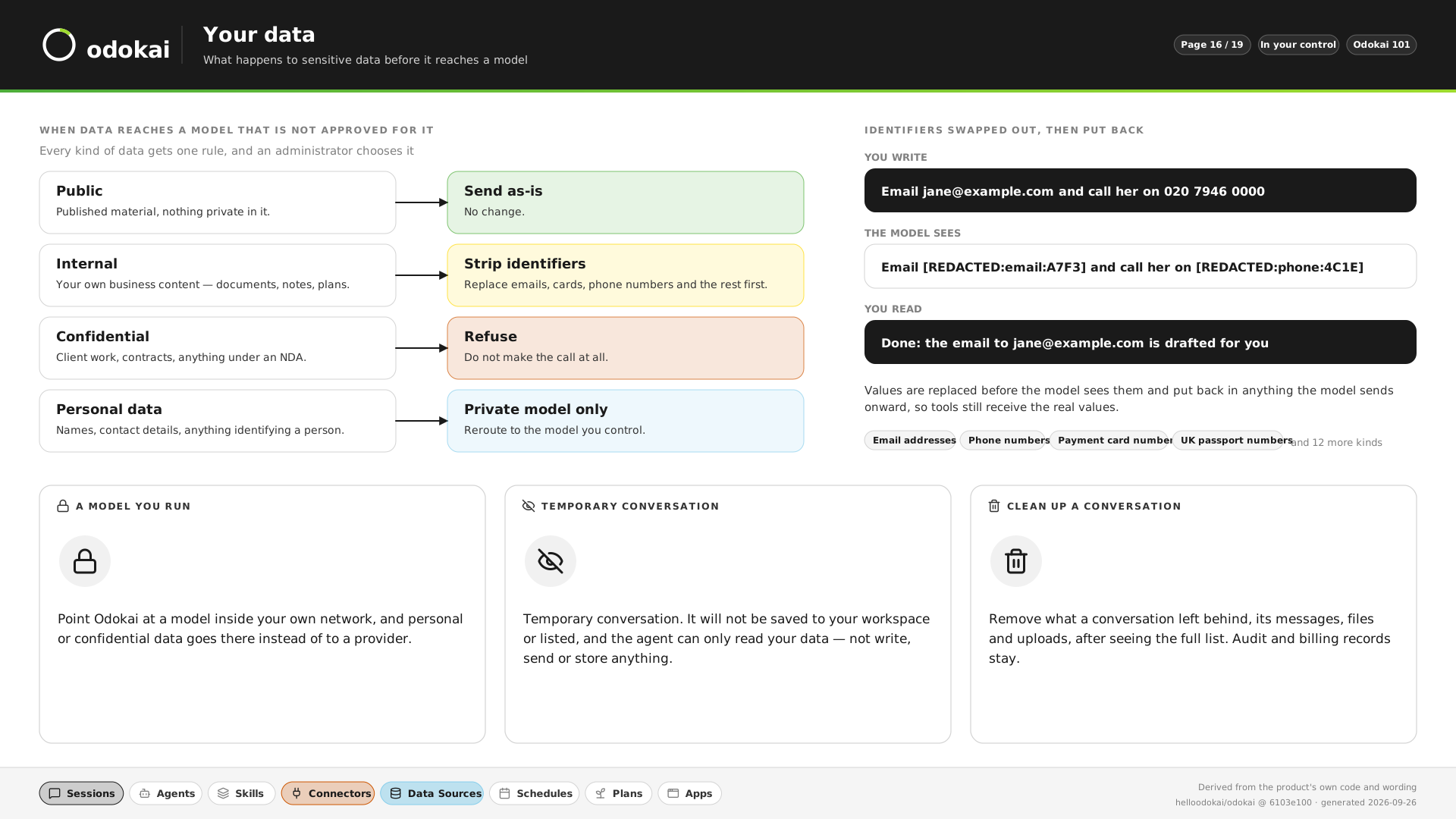
Your data
One rule for each kind of data: send as-is, strip identifiers, private model only, or refuse. Names and numbers are swapped out before a model sees them, and put back after.
See it in pictures -
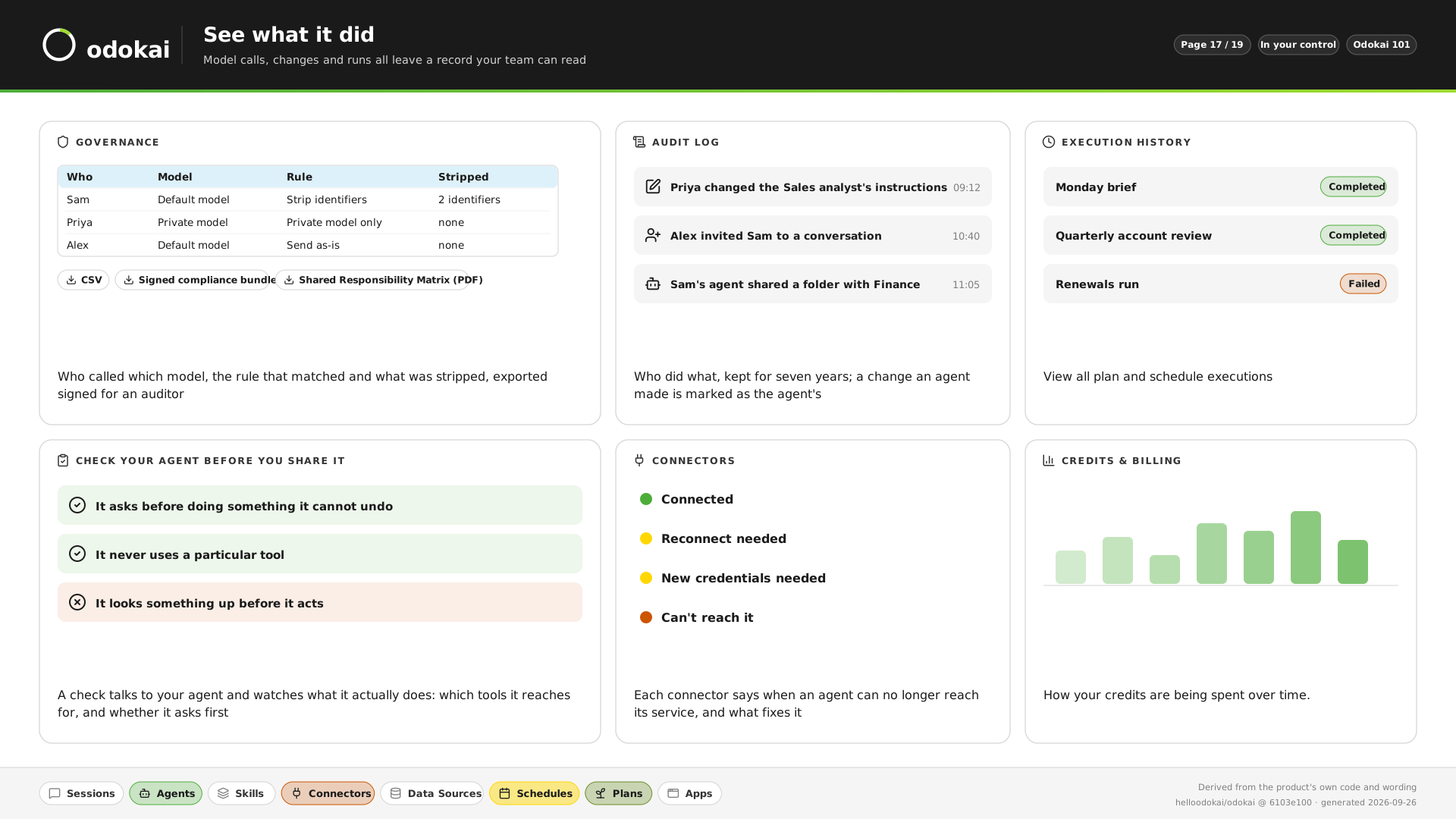
See what it did
Who called which model, what was stripped, who changed what, and every scheduled run, kept and exportable for an auditor.
See it in pictures -
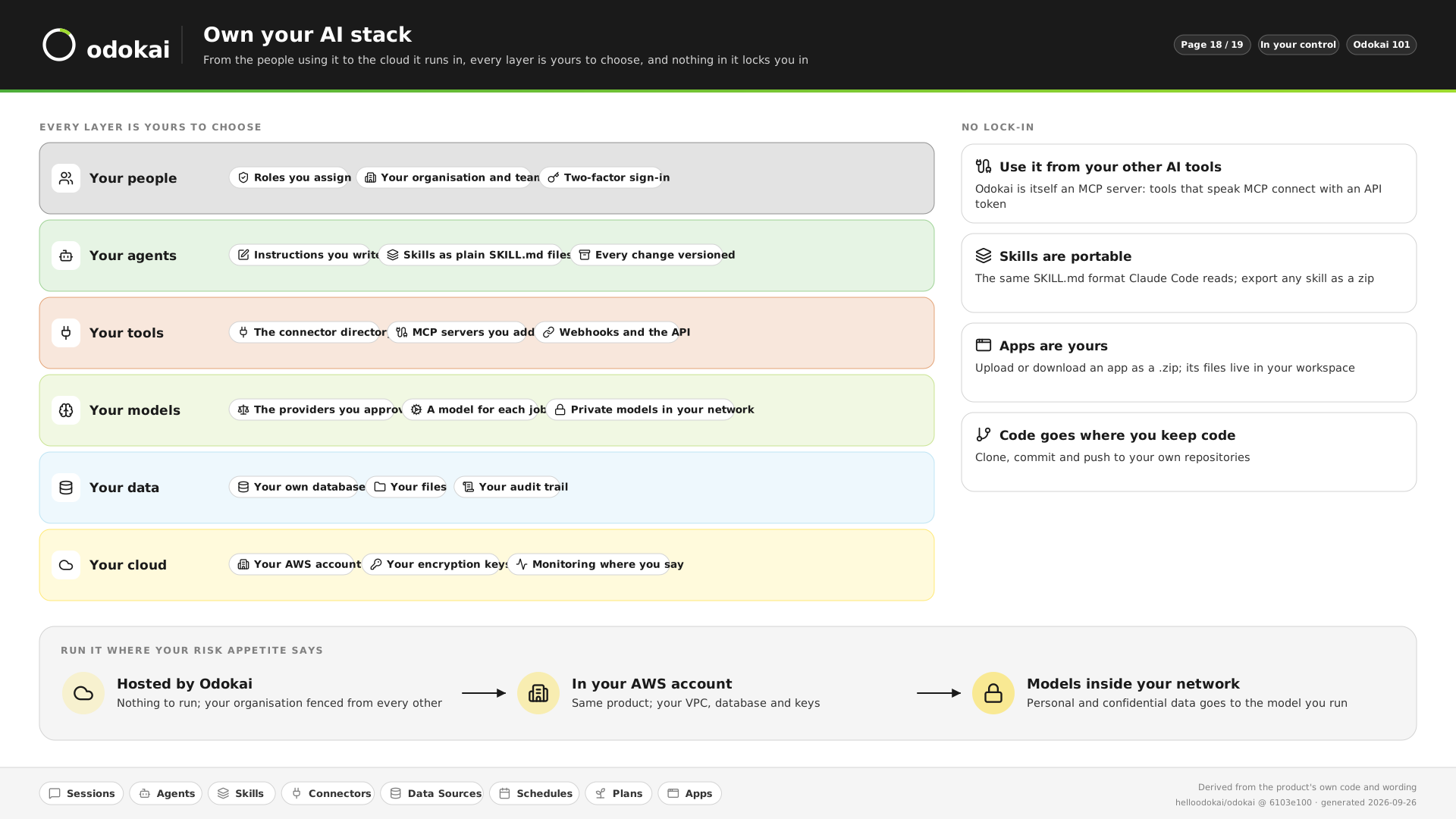
Own your AI stack
Hosted by us, or in your own AWS account with your own keys and models. Skills and apps export as files, so nothing locks you in.
See it in pictures -
The full picture
How Odokai compares with ChatGPT Enterprise, Copilot and Claude on security and controls, and which gaps are still open.
Read the comparison
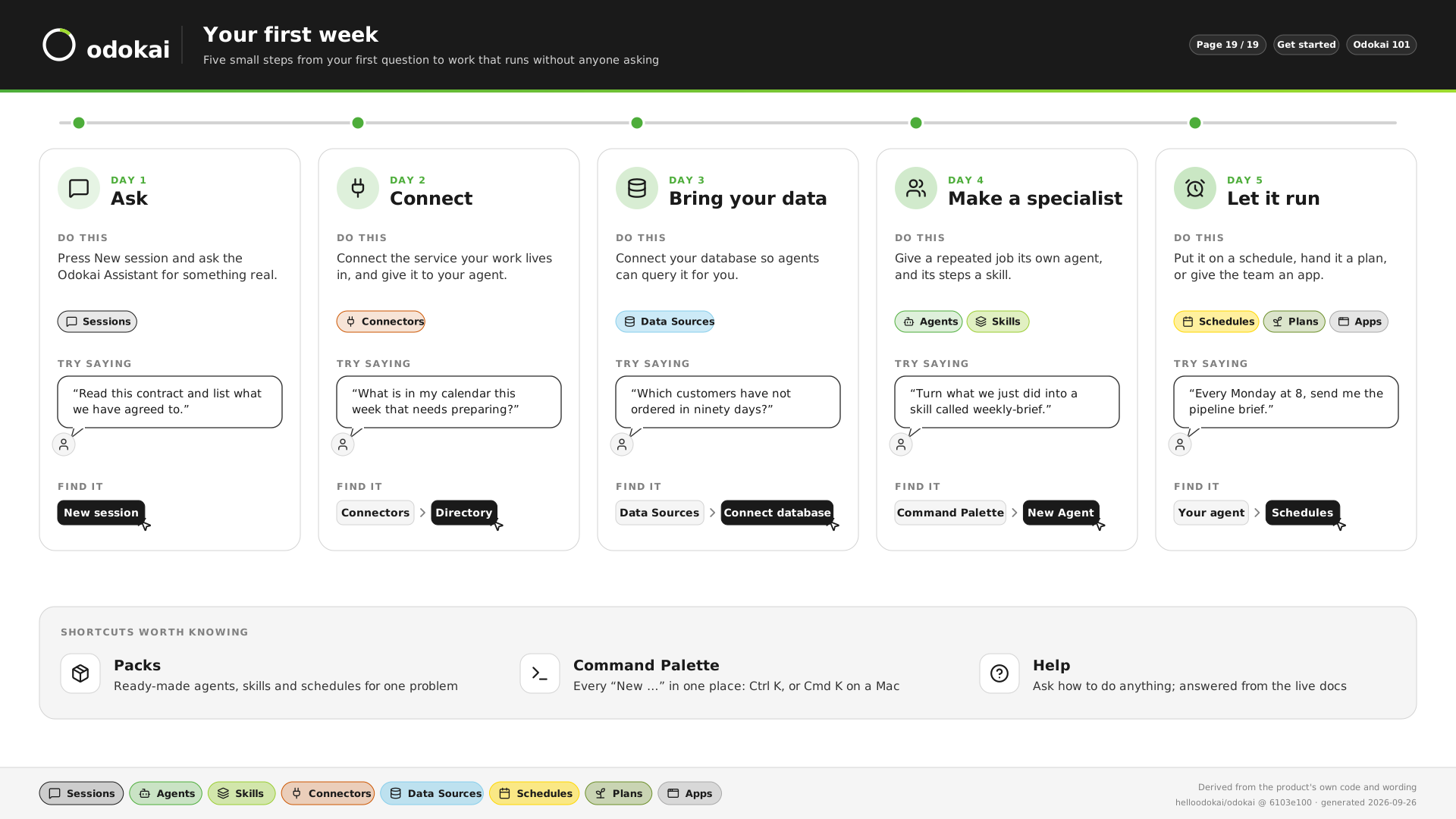
Your first week, one step a day.
From your first question to work that runs without anyone asking.
-
Day 1
Ask
Start a session and ask the Odokai Assistant for something real.
“Read this contract and list what we have agreed to.”
-
Day 2
Connect
Connect the service your work lives in, and give it to your agent.
“What is in my calendar this week that needs preparing?”
-
Day 3
Bring your data
Connect your database so agents can query it for you.
“Which customers have not ordered in ninety days?”
-
Day 4
Make a specialist
Give a repeated job its own agent, and its steps a skill.
“Turn what we just did into a skill called weekly-brief.”
-
Day 5
Let it run
Put it on a schedule, hand it a plan, or give the team an app.
“Every Monday at 8, send me the pipeline brief.”
We do day one with you. On a free 45-minute discovery call we build an agent for one of your jobs, live, on your own documents.
Book a Discovery Call